

Some screens still label this app Creative Tools. It is the same app.
The folders
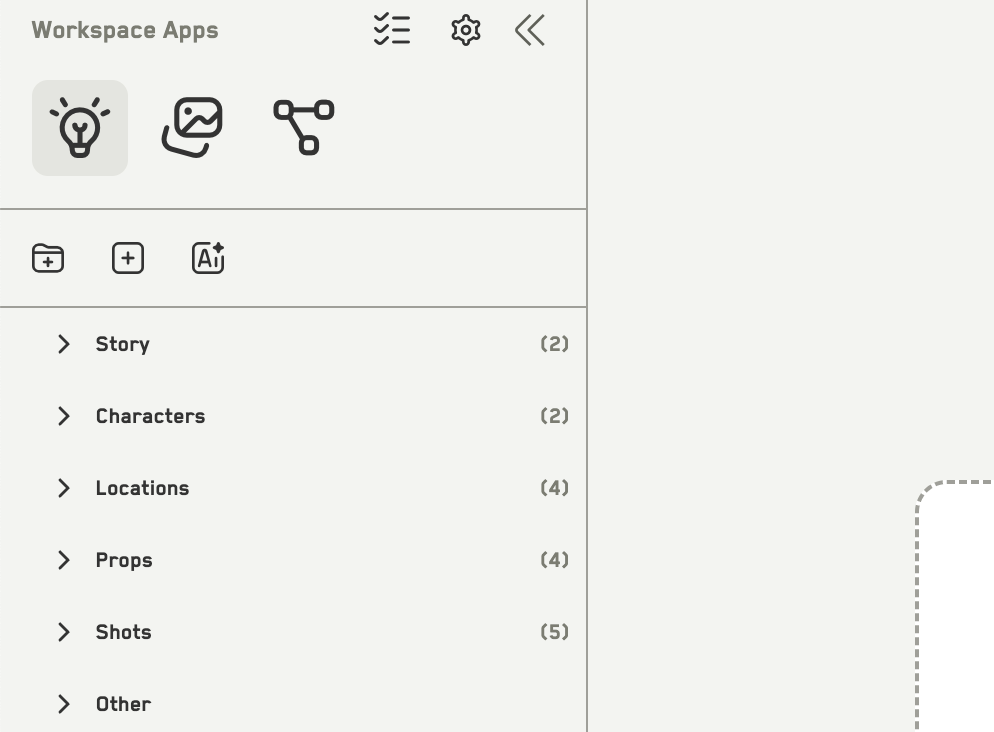
The six system folders
These six are system folders. You cannot rename, delete, or copy them, but you can create your own subfolders inside them.
What an idea holds
Each idea is a card with:- A type — outline, screenplay, character, location, prop, outfit, scene, shot, or other
- A summary, which is required
- Detailed content in Markdown
- Tags
- An image prompt and a video prompt
- Images and video attached to it
- Free-form metadata
How you build it up
Build with AI
Turn an outline or a premise into a whole set of ideas at once.
Create and edit ideas
Add ideas one at a time, by hand or with AI help.
Where the ideas go next
An idea is not the end product. From an idea you can:- Generate images and video in Idea Image Generation, with the idea as reference
- Drag it onto a canvas as a dataset node
- Feed it to the workspace AI chat as context